
The best place to start on project anatomy is to create a blank project.
Angularity has an init task that will create a new project and initialise it. By default, it will
create a new subdirectory.
All Angularity tasks will have default values for any options. So we can go ahead and invoke init simply as below.
angularity init
You will receive the following files.
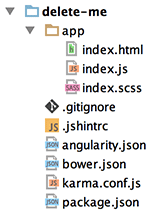
Composition Root
The init task will create an /app directory with files index.html, index.js, index.scss.
These files compose the primary application for this project. The entire /app directory should be version controlled.
You can create additional applications in sub-folders. However they will be development only since they will not be deployed by the
releasetask.
Angularity generates other directories as part of its build process. These are prefixed with app, such as app-build
and app-test. These generated directories should be ignored for version control.
All other directories are considered your local library. These files must be require()d or @imported into index.js
or index.scss respectively.
Git Ignore
Presuming you are using GIT, this file ensures version control will ignore generated directories and bower and npm packages.
JS Hint Config
A javascript linter is important to ensure code quality. Angularity uses JS Hint. The JS Hint
rule set is encoded in the .jshintrc file.
Angularity Config
Angularity has a limited number of settings that control your project. These are found in angularity.json.
Node and Bower Config
The composition roots may import from any node or bower packages. The init task creates basic package.json and
bower.json for node and bower respectively.
Each item in the bower dependencies map will be considered distributions and contribute directly to the HTML. Each
item in bower devDependencies will not contribute to the HTML but may be require()d or @imported into the
composition roots.
Each item in the node package depencencies or devDependencies may be require()d or @imported into the
composition roots. You may use the simple require(<PACKAGE_NAME>), meaning that the experience is the same as
developing for the node platform.
Karma Config
Angularity uses Karma for unit tests. This is configured using karma.conf.js.
Since Angularity performs a build step, the files and reporter entries will be overwritten by Angularity to create a
derived file /app-test/karma.conf.js.
… Everything Else
The remaining directories (baring installed bower and node packages) are considered your local library.
There are no special directories for sprites, images, javascript, html partials, css and scss. It is up to you what conventions you choose. However you organise these files, the composition root will import them will fully relative paths.
Any file can also import from bower and node packages that are installed, much like you would do when developing for the NodeJS platform.
This will be more apparent in the next section, when we look at an actual project.